Faseeh Recitation Lab

The human-powered data and annotation platform.

Qualified teachers identify, classify, and correct real-world recitation mistakes to create verified datasets for AI development.
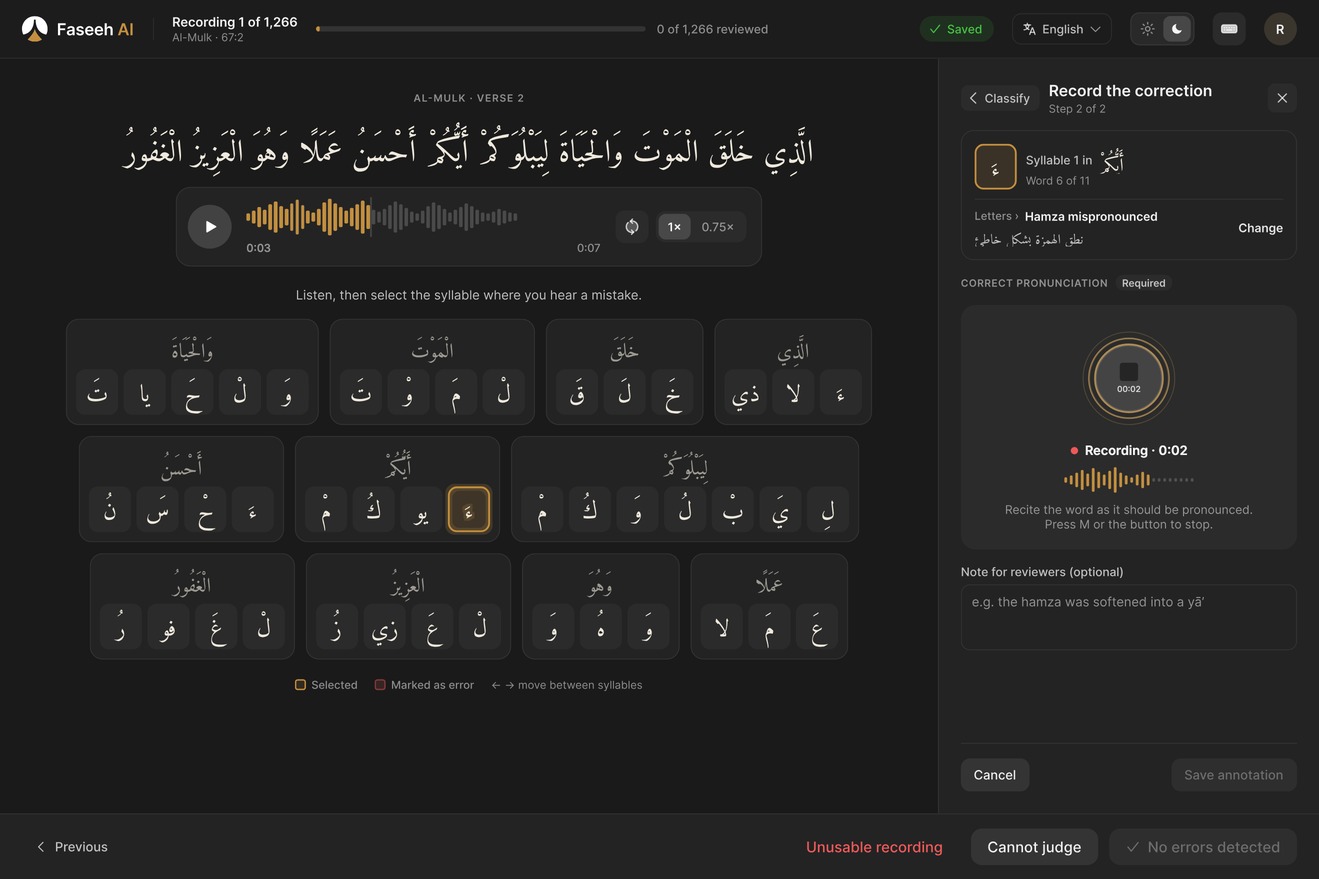
Faseeh Recitation Lab annotation workspace: a verse split into syllables, with a correction being recorded.
Introduction film

See Faseeh Recitation Lab at work.

0:56  ·  English  ·  Narrated  ·  Plays on click

Why annotation matters

Qur’anic AI is only as reliable as the review behind it.

  1. 01

    Recitation mistakes can be subtle.

    Small differences in pronunciation or sound duration can be difficult to identify.

  2. 02

    Expert review adds context.

    Qualified reviewers identify mistakes, classify them and document corrections.

  3. 03

    Structured examples support AI development.

    Reviewed examples can help train and evaluate recitation-analysis models.

Annotation workspace

Built around expert review.

Listen, identify, classify, correct, submit. Every step keeps the reviewer focused on the recitation, with the full Tajweed taxonomy one search away.

  1. 1 Listen Play the recording, at normal or slower speed.
  2. 2 Identify Select the letter where you hear a mistake.
  3. 3 Classify Choose from 44 error types, searchable in Arabic and English.
  4. 4 Correct Record the correct pronunciation and describe the mistake.
  5. 5 Submit Review your annotations, then submit.
In the workspace

A precise annotation workflow.

Qur’anic Arabic segmentation

Each word stays whole; units below are the exact letters and marks of the reference text (QUD-inspired exploration).

Error classification

11 categories, 44 error types, searchable in Arabic and English. No AI suggestions.

Audio playback

Play, loop and slow the recording to 0.75× until you are sure of what you heard.

Audio correction

Record the correct pronunciation, in separate takes you can redo one by one.

Written explanation

What was pronounced incorrectly, and how it should be corrected.

One structured annotation

Letter, word, error type, correction and explanation stay together.

Three independent reviews

Independent expert annotation.

Each recording is reviewed separately by three qualified teachers. No reviewer sees another’s work before submitting.

One recording Al-Mulk 67:2
Teacher 1 Hidden from the others 2 errors marked
الَّذِي خَلَقَ الْمَوْتَ وَالْحَيَاةَ لِيَبْلُوَكُمْ أَيُّكُمْ
Teacher 2 Hidden from the others 3 errors marked
الَّذِي خَلَقَ الْمَوْتَ وَالْحَيَاةَ لِيَبْلُوَكُمْ أَيُّكُمْ
Teacher 3 Hidden from the others 2 errors · different words
الَّذِي خَلَقَ الْمَوْتَ وَالْحَيَاةَ لِيَبْلُوَكُمْ أَيُّكُمْ
Kept separate Three independent sets of annotations. How they are compared and reconciled is defined by the Faseeh team.

Independent reviews make disagreements visible; they do not guarantee a correct consensus on their own. Marks shown are illustrative.

For research & organisations

Expert review for recorded recitations.

In the future, organisations working on Qur’anic research or AI may share their recordings for Faseeh’s qualified reviewers to annotate. Depending on each partnership agreement, the resulting annotations may support their research and Faseeh’s own model development. This is not a dataset marketplace.

Future opportunity · not open today
  1. Share recordingsRecordings and their verse references, under an agreement defined with each partner.
  2. Expert reviewQualified reviewers annotate in the Faseeh workspace, independently, three times.
  3. Annotated resultsStructured annotations delivered as agreed. Format and rights defined per partnership.
For qualified Qur’an teachers

Join as a Qur’an reviewer.

Reviewers annotate recordings for data quality. It is a separate role from Human Teachers, who teach students in lessons.

  1. ApplyBackground, readings, experience.
  2. Application reviewThe Faseeh team reviews each application.
  3. Approved accessA short introduction to the workspace.
  4. Annotation workspaceListen, mark, classify, correct, explain.

Applications are not open yet.

Better data starts
with expert review.

Both actions open only when the reviewer programme and collaborations are launched.